How It Works
Connect your apps in minutes, and your data flows beautifully — everywhere
Connect Your Apps
Link your fitness platforms in seconds. We support Hevy, Fitbit, and more coming soon. Just click, authorize, and you're connected.

Hevy

Fitbit

Strava
Apple HealthKit

Health Connect

Parkrun


GitHub

TrainingPeaks

Spotify
Select Your Sources
Pick where your workout data comes from. Create pipelines that pull from the apps you actually use—whether that's your weightlifting tracker or your smartwatch.
Apple HealthKit
File Upload
Strava
Hevy
Fitbit
GitHub
Health Connect

Intervals.icu

Wahoo

Garmin
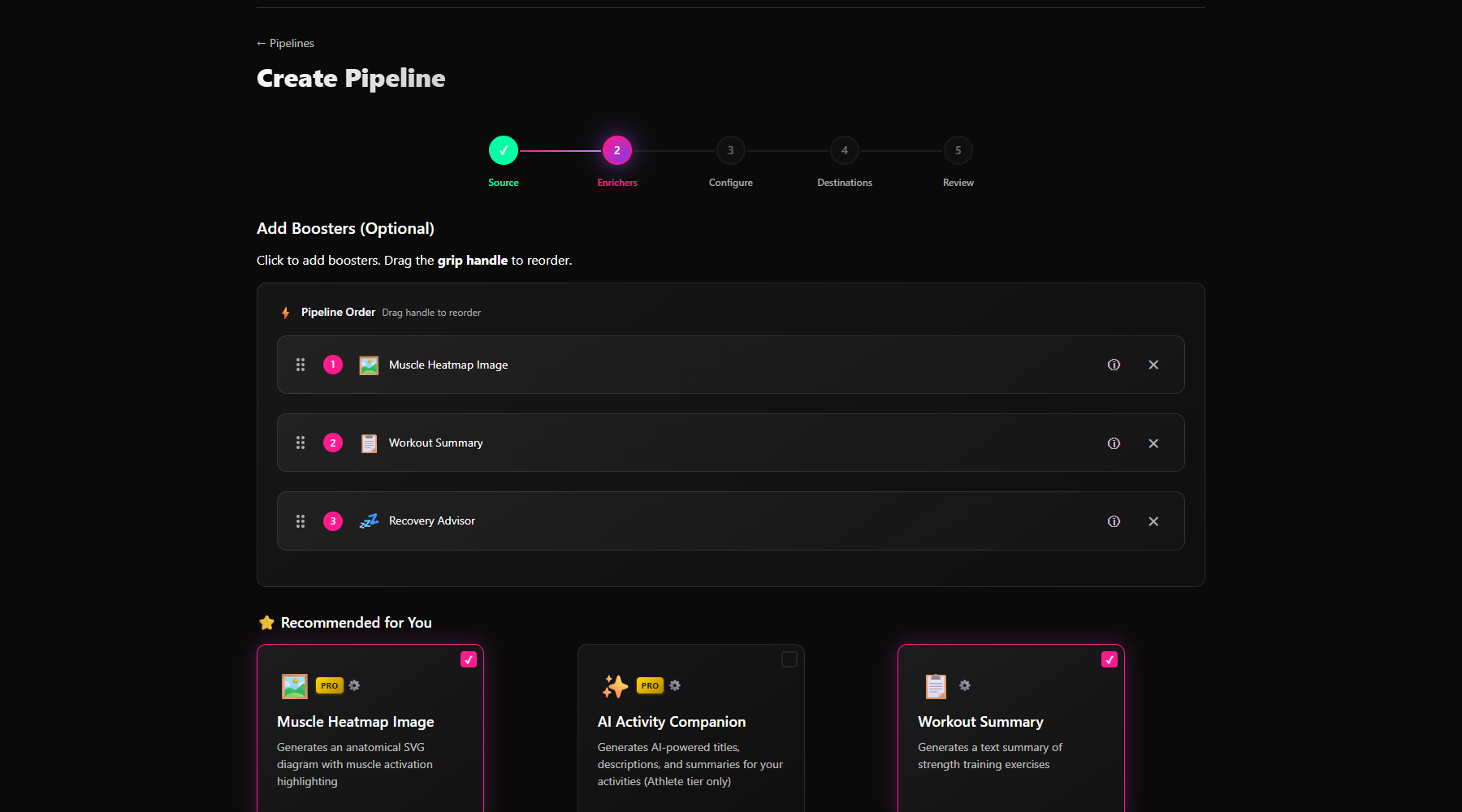
Configure Your Boosters
Choose which enhancements to apply to your activities. AI descriptions? Heart rate data from Fitbit? Muscle heatmaps? Mix and match to your liking.
Workout Summary
Muscle Heatmap
Muscle Heatmap Image
Route Thumbnail
AI Activity Banner
Fitbit Heart Rate
FIT File Heart Rate
Virtual GPS
Source Link
Type Mapper
Auto-Sync to Your Targets
Set your destination and forget about it. Every activity you complete is automatically boosted and synced to Strava—or wherever you want it to go.
Strava
Hevy
Showcase

Google Sheets
GitHub
TrainingPeaks
Intervals.icu
The Pipeline in Action
This entire process happens automatically, every time you work out.
Average sync time: under 30 seconds
Common Questions
How long does syncing take?
Most activities sync in under 30 seconds. The exact time depends on which boosters you've enabled—simple text boosters are instant, while AI features take a few seconds longer. Parkrun results sync automatically once the official results are published (usually about 2 hours after your run).
Is my data secure?
Absolutely. We use industry-standard encryption for all connections—we never see your passwords. Your data is encrypted in transit and at rest, and you can disconnect any integration or delete your data at any time.
Can I use FitGlue with multiple devices?
Yes! FitGlue is device-agnostic. Whether your workout comes from your phone, a Garmin watch, a Fitbit, or a gym bike—if it reaches a connected source, FitGlue will process it. You can even have multiple sources feeding into the same pipeline.
Does it work with all Hevy workouts?
Yes! Every workout you log in Hevy is automatically detected and processed. We enhance it with your chosen boosters and send it wherever you want. Note: API access requires Hevy Pro subscription.
Can I customize what gets synced?
You have full control. Create custom pipelines, choose specific boosters, and decide exactly where your data goes. You can even use filters to only process certain activity types. It's your fitness journey—you're in charge.
What if a sync fails?
We've built robust retry mechanisms. If a sync fails (rare!), we automatically retry. You can see the status of every activity in your dashboard, and failed syncs are clearly flagged so you know what happened.
What happens to my data if I cancel?
Your data stays yours. If you cancel your Athlete subscription, you'll drop to the free Hobbyist tier—your pipelines and history remain intact, you just lose access to premium features. If you delete your account, we permanently remove all your data from our servers.